

Dock
ML4W OS includes the ML4W Dock, a dock for Hyprland built with Quickshell. The colors are generated automatically from the wallpaper.
The dock appears at the bottom of the screen and shows the pinned and currently running apps.
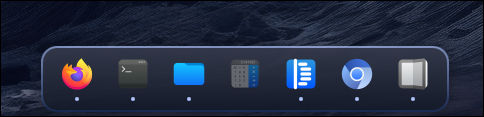
The ML4W Dock is developed in its own repository: https://github.com/mylinuxforwork/ml4w-dock. It is part of ML4W OS, but it also runs on its own on any Hyprland setup.
Usage
Right-click an app icon to open a context menu. From there you can pin or unpin the app, launch it or open a new window, and close its windows.
The launcher button on the left side of the dock opens the application launcher with a left click. A right click opens the dock menu with these entries:
- Reload Dock
- Settings: opens the settings dialog
- Edit configuration: opens
~/.config/ml4w-dock/config.jsonin your editor
Keybindings
| Keybinding | Action |
|---|---|
| SUPER + CTRL + D | Toggle the dock |
| SUPER + ALT + D | Toggle dock autohide |
| SUPER + SHIFT + D | Reload the dock |
The dock can also be toggled and reloaded from the sidebar.
Settings
The settings dialog has the following switches:
- Autohide: hides the dock until the pointer touches the bottom edge of the screen
- Launcher Icon: shows or hides the launcher button on the left side of the dock
You can open the dialog in three ways:
- from the dock menu (right-click the launcher button)
- from Settings in the Dock menu of the sidebar
- with the command
ml4w-dock settings
The ml4w-dock command
ML4W OS installs the dock into ~/.local/share/ml4w-dock and starts it from ml4w-autostart. The installer also adds the ml4w-dock command to ~/.local/bin, so you can start, stop and control the dock from a terminal.
ml4w-dock [command]| Command | Description |
|---|---|
start | Start the dock (default; does nothing if the dock is already running) |
stop | Stop the dock |
restart | Stop and start the dock |
toggle / enable / disable | Show or hide the dock |
autohideToggle / autohideOn / autohideOff | Toggle autohide |
reload | Re-read config.json and apply it |
settings | Open the settings dialog |
edit | Open config.json in the configured editor |
help | Show all commands |
Configuration
The dock is configured in one file only: ~/.config/ml4w-dock/config.json. The file is created on first start and merged over the built-in defaults, so it only needs the values you want to change. You can edit it directly, or open it with Edit configuration in the dock menu or with ml4w-dock edit.
INFO
In earlier versions the dock was configured in ~/.config/ml4w-dock/dock.json or ~/.config/ml4w/settings/dock.json. If one of these files exists, its settings are migrated into config.json on first start.
The dock writes some settings back into the file itself: enabled, autohide and the list of pinned apps.
Here is the default configuration with all available options:
{
    "dock": {
        "enabled": true,
        "autohide": false,
        "iconSize": 32,
        "spacing": 8,
        "marginBottom": 16,
        "reserveSpace": true,
        "hideDelay": 400,
        "launcherButton": true,
        "launcherCommand": "~/.config/hypr/scripts/launcher.sh",
        "editorCommand": "~/.config/ml4w/settings/editor.sh"
    },
    "pill": {
        "radius": 16,
        "padding": 12,
        "animationDuration": 350
    },
    "border": {
        "width": 2,
        "colorTop": "",
        "colorBottom": ""
    },
    "opacity": {
        "normal": 0.7
    },
    "theme": {
        "colorsFile": "~/.config/ml4w-dock/colors.json"
    },
    "apps": {
        "pinned": [
            "firefox",
            "kitty"
        ]
    }
}dock.launcherButton: shows or hides the launcher button. This is the same setting as the Launcher Icon switch in the settings dialog.dock.launcherCommand: the command that runs when you left-click the launcher button.dock.editorCommand: the editor that opensconfig.json. The file path is added as the last argument. If the value is empty or the program can't be found,xdg-openis used instead.theme.colorsFile: a JSON file of Material color roles (matugen'scolors.jsonformat). The dock watches this file and updates its colors when it changes. ML4W OS generates it from your wallpaper with matugen.
Both commands run through bash, so ~, arguments and pipes work.
After you change the configuration, reload the dock with SUPER + SHIFT + D, from the dock menu, or with ml4w-dock reload.
The full default configuration with comments is on GitHub: https://github.com/mylinuxforwork/ml4w-dock/blob/main/DockApp/config.json
Update
The dock is updated together with ML4W OS. To update only the dock, run the installation script again:
curl -sSL https://raw.githubusercontent.com/mylinuxforwork/ml4w-dock/main/install.sh | bashThe script pulls the latest version into ~/.local/share/ml4w-dock.